
Schedule
Drag work onto people or assets in your model-driven app. Every edit saves to your Dataverse row.
Explore the schedulerAdd a free scheduling board to your Dataverse app. Auto Schedule finds assignments for open work using mathematical optimisation and your rules.
 Built forPower Apps
 Native toDataverse
 Built onPower Platform
 Get it fromMicrosoft Marketplace
Use the free board on its own. Connect Auto Schedule when you want help filling open work.
Drag work onto people or assets in your model-driven app. Every edit saves to your Dataverse row.
Explore the schedulerMap Title, Start and End from your view. Add a Resource lookup when you need lanes.
Connect your dataFind assignments against your configured rules. Review the proposal before you Apply.
How Auto Schedule worksAuto Schedule proposes assignments. Every change stays on the board until you choose Apply.
Unassigned work waits beside the board.
Chrona scores assignments against your rules and priorities.
Compare the proposed changes with your current plan.
Keep the changes you accept, then write them to Dataverse.
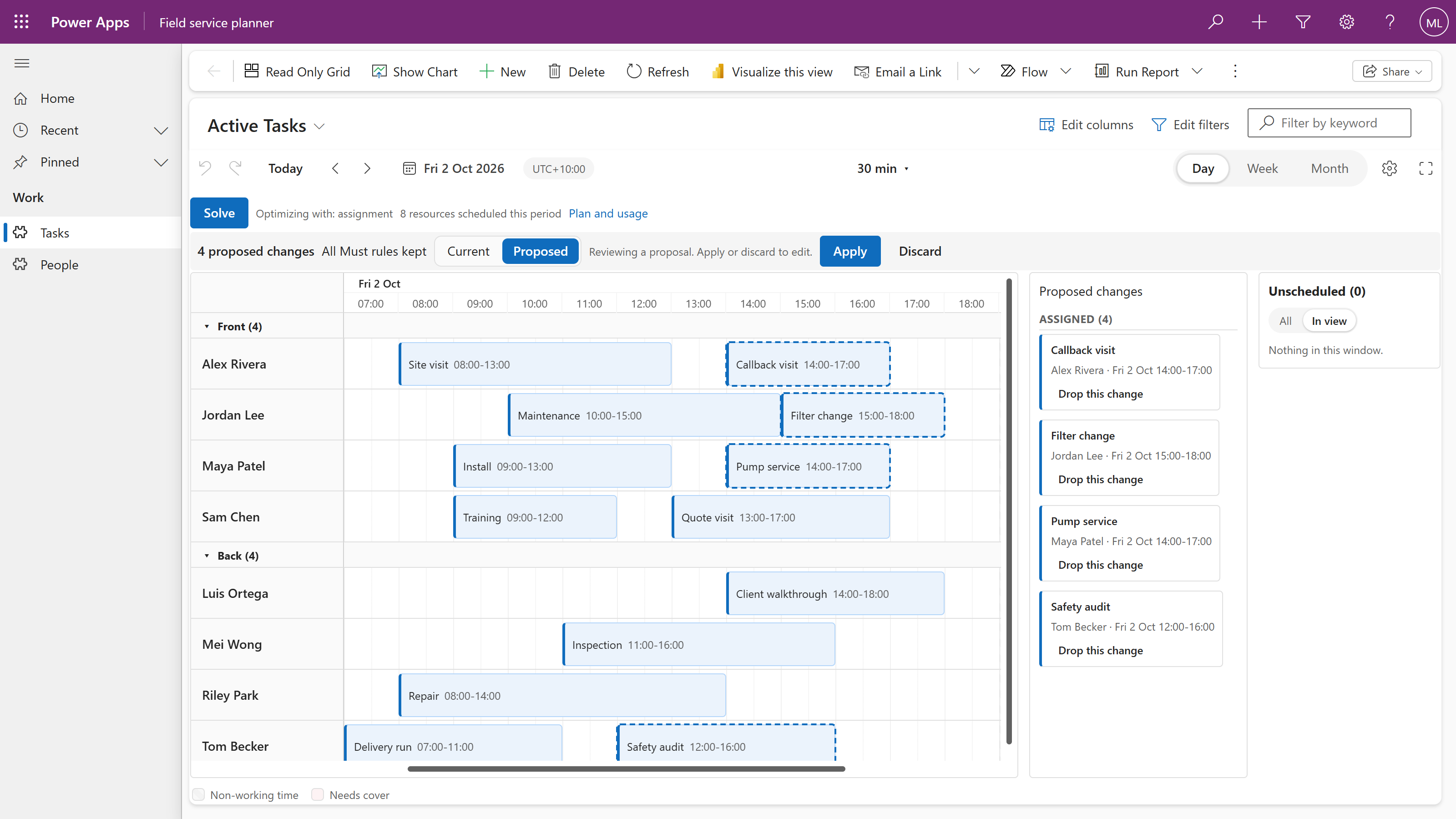
Chrona scores possible schedules against the rules you set. Skills, availability and working-time limits set boundaries; coverage, balance and personal preferences shape the trade-offs.
Supported award or agreement requirements must be configured for your operation. Industry-specific constraint packs are planned.
Put the Scheduler on a model-driven view. Map three columns; add a Resource lookup for lanes. Edits save to your Dataverse rows.
Chrona receives planning details for the selected period. Names, titles and notes are not sent; record IDs are replaced. The result returns as a proposal; your rows change only when you Apply.
See the data flowChoose columns from the view you want to schedule.
| Scheduler field | Your column |
|---|---|
| Title | Text |
| Start | Date and time |
| End | Date and time |
| Resource | Person or asset lookup optional, for lanes |
The free board fits your app. Auto Schedule adds proposals. Workforce Scheduler adds the full roster solution.
Add a scheduling board to your model-driven app and edit your Dataverse rows directly.
Install the free schedulerConnect your environment to get real assignment proposals on the same board.
Explore Auto ScheduleRoster your deskless and frontline teams with mathematical optimisation. Auto Schedule weighs skills, leave, demand and coverage at once.
Explore Workforce SchedulerWhen people, work and time need to line up, plan inside the application that runs your business.
Jobs, technicians and visits on one board today. Travel-time optimisation is not available yet.
Explore the solutionShifts, skills, availability and coverage for deskless and frontline teams, with Chrona Workforce Scheduler.
Explore the solutionAppointments, recurring visits and the people who deliver them, on the board today.
Explore the solutionImport the managed solution, bind your view and make your first drag.
Use Chrona in their existing Power Platform app, with their data and security roles.
Practical guides for the people building and running planning applications.
No. Chrona Scheduler is a component on a view of your model-driven app. Workforce Scheduler adds rostering tables and an app around the same board.
The free Scheduler reads and saves your Dataverse rows in your app. When you use Auto Schedule, Chrona receives planning details for the selected period. Names, titles and notes are not sent; record IDs are replaced. You can inspect what is sent before the first run.
No. Supported scheduling requirements must be configured and checked for your use case. Industry-specific constraint packs are planned.
Start with the free scheduler. Add Auto Schedule when you need it.